Building an MCP Server & MCP App for Kubernetes @ Dutch AI Con
Last week I was attending Dutch AI Con, and the workshops on building an MCP server and exploring the new MCP Apps extension made one thing very clear: this is no longer just “future cool” tech; it is something you can actually use right now.
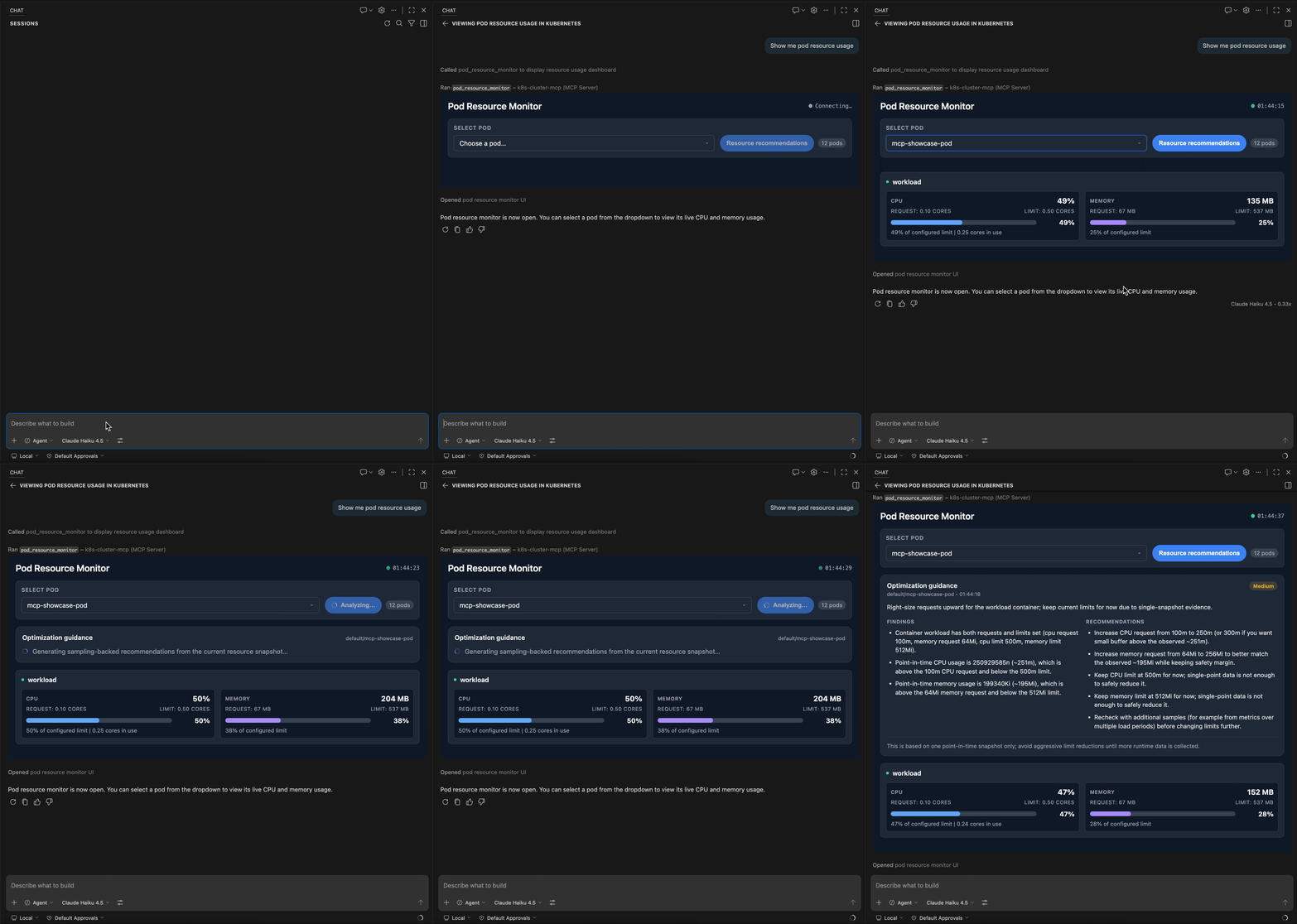
So I built a small MCP server and MCP App showcase for Kubernetes that opens live pod CPU and memory usage in chat and then gives optimization guidance based on real metrics.
That is the whole game: not just talk about infra, but actually look at it!
What I built
The project is called k8s-cluster-mcp-showcase.
It combines three pieces:
- a FastMCP server in Python
- an MCP App UI embedded inside the client
- Kubernetes integration using pods and
metrics-server
So when I ask the assistant about pod resources, it can open an interactive dashboard, show live CPU and memory usage, and give optimization suggestions for a selected pod.
That is where this starts to get interesting. The assistant is not just describing a system. It is looking at something real.
Why I wanted to build this
A lot of AI demos stop at “look, the tool was called.”
That is fine for a proof of concept, but it is not the part that gets me excited.
What I wanted was something that feels closer to an actual operator workflow. Open the UI inside the client. Pull live data from the cluster. Then let the model reason on top of that.
That changes the feel of it completely.
It stops being a chat that talks about infrastructure and starts feeling more like a chat that can inspect infrastructure with you.
What the flow looks like
The flow is pretty simple.
You ask for pod resource usage.
The MCP server opens the dashboard inside the client.
The dashboard polls metrics every second.
You select a pod, or preselect one through the prompt.
Then you trigger optimization guidance and get back a structured response with a summary, findings, confidence, and caution.
That loop feels surprisingly good. Very close to having a tiny SRE sidekick sitting in the chat with you.
MCP App registration
The important bit is that the dashboard is exposed as a resource, then opened through a tool.
@mcp.resource("ui://k8s-cluster/pod-monitor.html", mime_type="text/html")
def pod_monitor_html() -> str:
    return UI_HTML_PATH.read_text()


@mcp.tool(app=AppConfig(resource_uri="ui://k8s-cluster/pod-monitor.html"))
def pod_resource_monitor(pod_name: str | None = None, namespace: str | None = None) -> str:
    return _pod_resource_monitor(pod_name, namespace)
That is what makes the assistant open a real in-client dashboard instead of replying with plain text.
Live metrics: use actual cluster data
The dashboard is not rendering mock data. It reads from metrics-server and pulls the current CPU and memory usage for the selected pod.
metrics = custom_api.get_namespaced_custom_object(
    group="metrics.k8s.io",
    version="v1beta1",
    namespace=namespace,
    plural="pods",
    name=pod_name,
)

container_metrics = [
    {
        "name": c["name"],
        "current_cpu": c.get("usage", {}).get("cpu", "unknown"),
        "current_memory": c.get("usage", {}).get("memory", "unknown"),
    }
    for c in metrics.get("containers", [])
]
That matters because the optimization step is based on a real snapshot, not a fabricated example.
Optimization contract: keep it structured
Once the pod spec and current metrics are collected, the server uses MCP Sampling to ask the connected model for a strict JSON response.
result = await ctx.sample(
    messages=(
        f"Optimize Kubernetes pod resources for {namespace}/{pod_name}.\n\n"
        f"Pod resource data:\n{json.dumps(pod_data, indent=2)}\n\n"
        "Return exactly one JSON object with summary, findings, "
        "recommendations, confidence, and caution."
    ),
    system_prompt=(
        "You are a senior Kubernetes platform engineer. "
        "Provide conservative, actionable resource optimization guidance."
    ),
    max_tokens=700,
)
Why this works well
For me, this setup hits a really nice balance.
It is grounded because the recommendations start from live metrics and actual pod configuration.
It is interactive because the inspection stays inside the client instead of bouncing you out to another dashboard.
It is structured because the optimization response comes back in a predictable format.
And it is practical because the whole thing is simple enough to run locally with kind and metrics-server.
That last part matters too. I like demos that are easy to understand, but I like them even more when they are easy to run.
If you want to try it
The repo includes a one-command showcase script that creates or reuses a kind cluster, installs metrics-server, deploys a demo pod, deploys the MCP server, and exposes it over HTTP.
Minimal client config looks like this:
{
  "mcp": {
    "servers": {
      "k8s-cluster-mcp": {
        "type": "http",
        "url": "http://localhost:8000/mcp"
      }
    }
  }
}
From there, you can connect with an MCP-capable client and start asking about pod resource usage.
Public repo
The full project is public on GitHub, including the MCP server, the optimization logic, the UI app, and the showcase script.